

Description
Chrome Theme with Uptodown Artwork
Download the latest version of this Chrome Theme based on Uptodown Artwork, designed for users who want a unique and visually appealing browsing experience. This lightweight desktop utility offers a fresh look to your Chrome browser with a design inspired by the iconic Uptodown artwork. Perfect for fans of clean, modern aesthetics and those who enjoy personalizing their digital workspace.
Overview
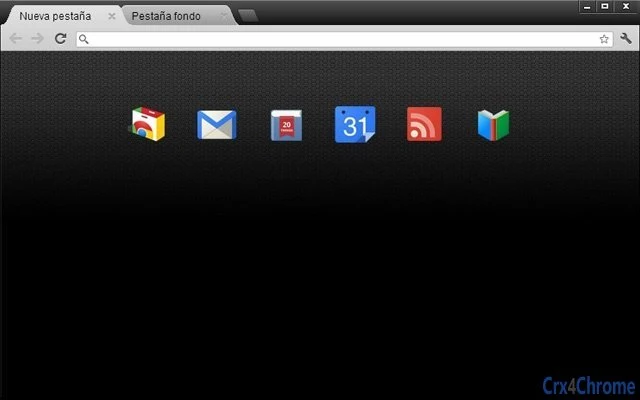
The software is a browser theme tailored for Google Chrome, offering a visual redesign of the browser’s interface based on the distinctive Uptodown artwork. Its primary purpose is to enhance the user’s desktop experience by introducing a cohesive and visually engaging design language. The theme is ideal for individuals who value personalization and enjoy expressing their digital identity through customization. Target users include casual web users, design enthusiasts, and anyone seeking a more vibrant and unique browsing environment. The developer did not provide additional information about the company or background. Real-world usage scenarios include personalizing a work or home PC, creating a consistent look across devices, or simply refreshing the appearance of a frequently used browser. The theme is intended for desktop users who use Chrome as their primary browser and want a subtle yet impactful change to their interface.
Key Features & Capabilities
- Uptodown-Inspired Design – The theme features a visual layout and color scheme derived from Uptodown’s well-known artwork, delivering a distinct and memorable look.
- Lightweight Installation – At just 2.1 MB, the theme is minimal in size and does not impact system performance.
- Easy Browser Integration – Designed specifically for Chrome, it applies seamlessly through the browser’s theme manager.
- Visual Consistency – Maintains a unified appearance across the browser’s toolbar, tabs, and new tab page.
- Non-Functional Customization – Focuses solely on visual presentation, with no impact on browser functionality or performance.
Users can apply the theme to create a branded or stylized browsing environment, especially useful for fans of Uptodown or those who appreciate creative design elements. The theme is particularly effective when used alongside other Chrome extensions that support a consistent aesthetic. It serves as a simple yet effective tool for users who want to make their browser feel more personal without altering core functionality.
User Interface, Workflow & Performance
The theme modifies the Chrome browser’s interface through visual styling, including the toolbar, tab bar, and new tab page. Navigation remains unchanged, as the theme does not alter the underlying browser workflow. Users can apply the theme directly from Chrome’s settings without requiring additional tools or complex steps. The interface is consistent with standard Chrome design patterns, ensuring intuitive use. The developer did not specify resource usage details, but the small file size suggests minimal impact on system performance. Performance observations are based on general software behavior patterns. Stability is expected to be high, as browser themes typically do not introduce crashes or errors. The theme does not run background processes or consume significant CPU or RAM, making it suitable for use on a wide range of systems.
Compatibility & System Requirements
The software is compatible with Windows and Mac operating systems, supporting the latest versions of Google Chrome on both platforms. The installation size is 2.1 MB, which is standard for browser themes. Exact system requirements were not listed. Compatibility information was partially provided, with the focus on Chrome’s support across major desktop platforms. No hardware-specific demands were mentioned. The theme is designed for desktop use and does not support mobile browsers or other Chromium-based applications.
Pros and Cons
Pros
- Visually distinctive design inspired by Uptodown artwork
- Lightweight and fast to install
- Simple application process via Chrome settings
- Safe and non-intrusive—no performance impact
- Free to download and use
Cons
- Only affects visual appearance, no functional enhancements
- Limited to Chrome browser only
- No customization options beyond the default design
- Not suitable for users seeking advanced browser tools
- Theme may not appeal to users preferring minimal or neutral interfaces
FAQ Section
Is this theme compatible with all Chrome versions?
The theme is designed for current versions of Google Chrome on Windows and Mac. Compatibility with older or experimental Chrome builds is not guaranteed.
Is the theme safe to install?
Yes, the theme is a standard Chrome extension with no known security risks. It does not collect user data or modify browser behavior beyond visual styling.
How do I update the theme?
Updates are automatically managed by the Chrome Web Store. Users will receive updates when available, provided the theme is installed from the official source.
Can I use this theme offline?
Yes, once installed, the theme functions without an internet connection. The visual appearance remains consistent even when offline.
What license type does this theme use?
The software is distributed as free-to-use with no restrictions. It is intended for personal and non-commercial use.
Final Thoughts + CTA
This Chrome Theme offers a clean, visually engaging way to personalize your browsing experience with a design rooted in Uptodown’s distinctive artwork. While it doesn’t add new functionality, it delivers a polished and consistent aesthetic that enhances the look of your browser. Ideal for users who appreciate design and customization, it stands out as a simple yet effective desktop utility. The lightweight nature and zero cost make it accessible to a broad audience. For anyone looking to refresh their Chrome interface with a unique, branded look, this theme is a compelling choice. Download Chrome Theme with Uptodown Artwork now.
Guides & Tutorials for Uptodown Theme for Chrome
How to install Uptodown Theme for Chrome
- Click the Preview / Download button above.
- Once redirected, accept the terms and click Install.
- Wait for the Uptodown Theme for Chrome download to finish on your device.
How to use Uptodown Theme for Chrome
This software is primarily used for its core features described above. Open the app after installation to explore its capabilities.
User Reviews for Uptodown Theme for Chrome 0
No reviews found





